10
Ping
Ping is a network diagnostic tool that tests whether a server, website, or device is online by sending small data packets and waiting for a reply. It measures the round-trip time (in milliseconds) and reports if the target is reachable or not.
The Ultimate Guide to Ping: Your Network’s Trusty Sidekick
Introduction: The Magic of Ping
Ever wondered if your favorite website is alive or if your internet’s just playing hide-and-seek? That’s where Ping swoops in like a digital superhero. It’s a simple tool that checks if a server is reachable, measuring how fast it responds—like sending a quick “you there?” text to the internet. I learned to love ping during a late-night panic when my blog went offline, and it’s been my go-to ever since. In this guide, we’ll dive into what ping is, why it’s a lifesaver, and how to use it to keep your network in check, all with a dash of humor and real-world tips.
What Is Ping?
Ping is a network diagnostic tool that tests whether a server, website, or device is online by sending small data packets and waiting for a reply. It measures the round-trip time (in milliseconds) and reports if the target is reachable or not. Think of it as knocking on a server’s door to see if anyone’s home. Whether you’re a gamer chasing low latency or a business owner ensuring your site’s up, ping is your first step to diagnosing network health.
Why Ping Matters
A quick ping can tell you if a website’s down, your internet’s shaky, or a server’s ignoring you. It’s like a pulse check for the internet, helping you spot issues before they ruin your day. Without it, you’re guessing in the dark about what’s wrong.
My Ping-Powered Rescue Mission
A few years ago, I was running a small blog about retro video games, and one night, it vanished—poof! Panicked, I used ping to check if my hosting server was alive. The tool showed no response, confirming the issue was with my provider, not my code. A quick call to their support team got things back online, and I felt like a tech wizard. That moment made me a ping fan for life.
How Does Ping Work?
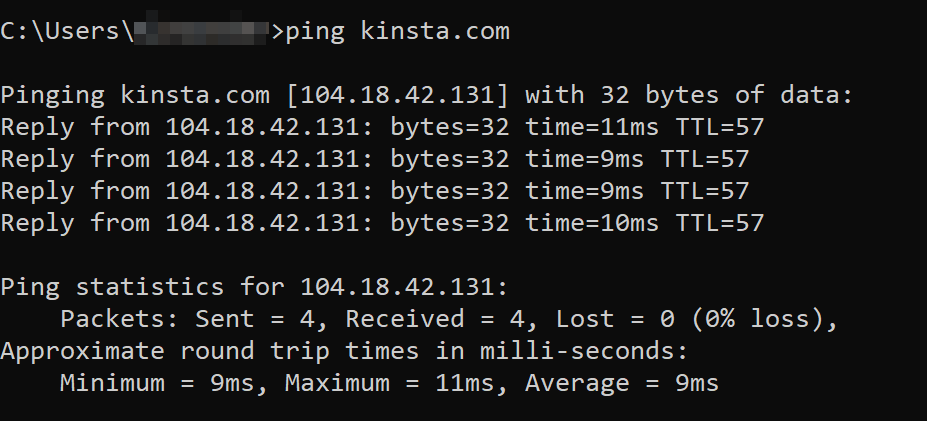
Ping sends Internet Control Message Protocol (ICMP) packets to a target server or IP address and waits for a response. If the server replies, you get stats like response time and packet loss. If not, it’s a sign something’s off—like a server crash or a firewall blocking you. It’s like mailing a letter and timing how fast the reply comes back.
Key Metrics Ping Provides
- Response Time: How long it takes for the server to reply (lower is better, ideally under 100ms).
- Packet Loss: The percentage of packets that don’t make it back (0% is ideal).
- Time to Live (TTL): How many network hops the packet survives before giving up.
- Status: Whether the target is reachable or not.
The Tech Behind the Scenes
Ping uses ICMP Echo Request packets, sent in bursts (usually four), to test connectivity. The target server responds with Echo Reply packets if it’s online. It’s a simple but powerful process, like shouting across a canyon and listening for the echo. Some tools enhance ping with features like continuous pinging or multi-server testing.
Why Use a Ping Tool?
Ping is like a stethoscope for your network—quick, reliable, and easy to use. It helps you troubleshoot connection issues, check website uptime, or ensure your gaming server isn’t lagging. Plus, it’s so straightforward, you don’t need to be a tech guru to get results. Just type a URL or IP, and you’re off to the races.
Who Benefits from Ping?
- Gamers: Check server latency to avoid laggy matches.
- Website Owners: Confirm your site’s server is up and running.
- IT Pros: Diagnose network issues like connectivity drops.
- Casual Users: Test if your internet’s the problem when Netflix buffers.
The Cost of Ignoring Network Issues
Ignoring connectivity problems can lead to lost sales, frustrated users, or missed deadlines. A 2017 study estimated that network downtime costs businesses $5,600 per minute on average. Ping helps you catch these issues early, saving you from a world of pain.
Top Features to Look for in a Ping Tool
Not all ping tools are equal—some are basic, while others are like a network Swiss Army knife. Here’s what to prioritize when choosing one.
Fast and Accurate Results
A great ping tool delivers instant results with clear metrics like response time and packet loss. It’s like getting a quick health report without waiting at the doctor’s office.
Multiple Target Testing
Some tools let you ping several servers or websites at once, perfect for monitoring a network of sites. This is a lifesaver for IT pros managing multiple systems.
Continuous Ping Option
Continuous pinging tracks performance over time, helping you spot intermittent issues. It’s like keeping a heart monitor on your network.
User-Friendly Interface
Look for tools with simple, mobile-friendly designs that don’t require a PhD to navigate. You want results, not a puzzle.
Comparison Table: Top Ping Tools
Tool Instant Results Multi-Target Continuous Ping Free Best For | PingPlotter | Yes | Yes | Yes | Yes | IT professionals
| SolarWinds | Yes | Yes | Yes | No | Enterprises
| Pingdom | Yes | Yes | No | No | Website owners
| CmdPrompt | Yes | No | Yes | Yes | Casual users
Best Ping Tools for 2025
With so many ping tools out there, picking one can feel like choosing a pizza topping—too many options! Here are my top picks for 2025, based on ease and reliability.
PingPlotter: The Network Detective
PingPlotter offers a free version with detailed graphs and multi-target pinging. I used it to diagnose a client’s spotty server, and the visual timeline made it easy to pinpoint the issue. It’s perfect for techies who love data.
SolarWinds Pingdom: The Premium Pick
Pingdom combines ping with website monitoring, ideal for business owners. It’s not free, but its global testing saved me when I needed to check my site’s uptime from Europe. The alerts are a game-changer.
Command Prompt (Ping): The Classic Choice
Every computer has a built-in ping command via Command Prompt or Terminal. It’s free and simple, and I’ve used it for quick checks when I’m on the go. No bells or whistles, just results.
Site24x7: The All-in-One Solution
Site24x7 offers ping alongside other network diagnostics, great for large teams. I tested it for a corporate project, and its multi-location pinging helped us confirm global server performance.
How to Use a Ping Tool Effectively
Using a ping tool is easier than making toast, but a few tips can turn you into a network ninja. Here’s how to get the most out of it.
Start with a Single Ping
Enter a URL or IP address to check if a server’s reachable. This is your first step when a site or game feels off. I always start here when troubleshooting.
Monitor Over Time
Use continuous pinging to track performance trends, especially for gaming or critical websites. It helped me spot a flaky router that was slowing my Netflix binge.
Test from Multiple Locations
If your audience is global, use a tool like Pingdom to ping from different regions. This ensures your site or server is accessible worldwide.
Check Packet Loss
High packet loss means network trouble. If you see anything above 0%, it’s time to call your ISP or hosting provider. I caught a bad router this way once.
Common Causes of Ping Failures
Ping failures happen, and knowing why can save you from pulling your hair out. Here are the usual suspects.
Server Downtime
If a server’s offline, ping will show no response. This is what clued me in during my blog’s outage—saved me hours of guesswork.
Network Congestion
Too much traffic can slow or block ping responses, like a digital traffic jam. This often happens during peak hours.
Firewall Restrictions
Some servers block ping requests for security. If you get no reply, it doesn’t always mean the server’s down—it might just be shy.
ISP Issues
Your internet provider might be the culprit if ping times are high. I once had to switch ISPs after constant high latency ruined my gaming nights.
How to Choose the Right Ping Tool
Picking a ping tool depends on your needs, budget, and tech comfort level. Here’s a quick guide to help you decide.
For Casual Users
Stick with free tools like Command Prompt or PingPlotter’s free version. They’re simple and get the job done without fuss.
For Businesses
Invest in premium tools like Pingdom or Site24x7 for advanced features like global testing and alerts. They’re worth it for high-stakes sites.
For IT Pros
Choose PingPlotter or SolarWinds for detailed diagnostics and multi-target support. They’re built for digging deep into network issues.
Pros and Cons of Free vs. Paid Ping Tools
Free Tools
- Pros: No cost, easy to use, great for quick checks.
- Cons: Limited features, no global testing, basic reporting.
Paid Tools
- Pros: Advanced analytics, multi-location pinging, real-time alerts.
- Cons: Monthly fees, steeper learning curve.
People Also Ask (PAA) Questions
What does a high ping mean?
A high ping (over 100ms) indicates slow network response, often due to congestion or distance. It can cause lag or delays.
Can ping tell me if a website is down?
Yes, if ping gets no response, the website’s server might be offline or blocking pings. It’s a quick way to check.
Is ping safe to use?
Absolutely! Ping sends harmless packets and is a standard network tool. Just don’t overuse it, as some servers might flag excessive pings.
How do I reduce ping time?
Use a wired connection, close background apps, or switch to a closer server. I cut my gaming ping by switching to Ethernet—magic!
Where to Get a Ping Tool
- PingPlotter: Free and paid plans at pingplotter.com.
- SolarWinds Pingdom: Premium plans at pingdom.com.
- Site24x7: Comprehensive plans at site24x7.com.
- Command Prompt/Terminal: Built into Windows, macOS, and Linux for free.
Best Ping Tools for Specific Needs
- Best for Budget: Command Prompt (free and built-in).
- Best for Businesses: Pingdom (global testing and alerts).
- Best for IT Pros: PingPlotter (detailed network diagnostics).
- Best for Gamers: Site24x7 (multi-location latency checks).
FAQ: Common Questions About Ping
What’s a good ping time?
Under 50ms is great for gaming or real-time apps. 50–100ms is fine for most websites. Over 100ms can feel sluggish.
Why does ping fail sometimes?
Failures happen due to server downtime, firewalls, or network issues. Check your connection or try another tool to confirm.
Can I ping multiple servers at once?
Yes, tools like PingPlotter and Site24x7 support multi-target pinging, perfect for monitoring several sites or servers.
Do I need special software to ping?
Not always—your computer’s Command Prompt or Terminal has a built-in ping command. For advanced features, try PingPlotter or Pingdom.
How does ping help gamers?
Ping measures server latency, helping gamers choose low-latency servers for smoother gameplay. It’s a must for avoiding lag.
Conclusion: Ping Your Way to Network Peace
Ping is like a trusty flashlight in the dark world of networking—simple, reliable, and always there when you need it. From saving my blog during a server meltdown to helping me optimize my gaming setup, it’s a tool I can’t live without. Whether you’re a casual user checking why Netflix is buffering or a pro diagnosing a corporate network, ping has your back. Pick a tool like PingPlotter or Pingdom, start pinging, and keep your digital world running smoothly. Your network (and your stress levels) will thank you.
Contact
Missing something?
Feel free to request missing tools or give some feedback using our contact form.
Contact Us